Desk cable management works best when each type of cable gets the right route. Keep daily charging ends within reach, guide monitor cables along one edge, and move power strips and excess cable below the desktop.
Choose the right cable management method
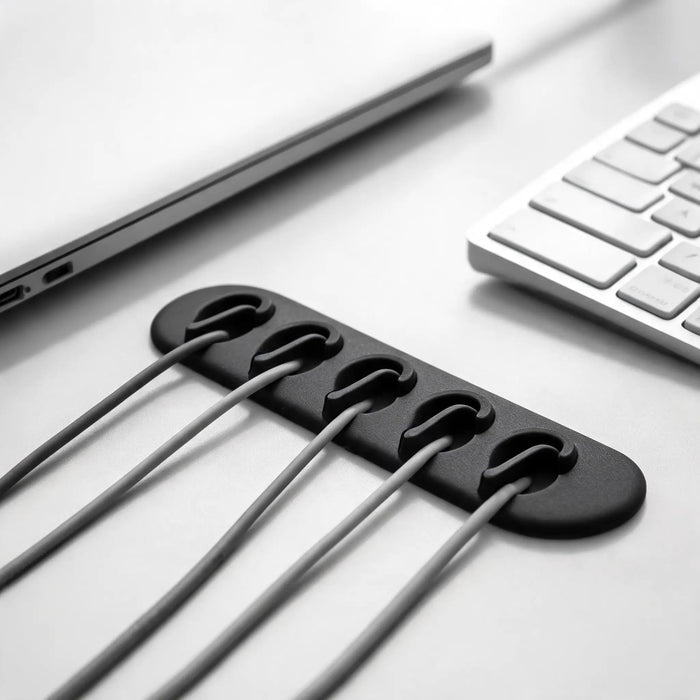
Cable dock
Keeps phone, laptop, headphone, and accessory cable ends from slipping behind the desk.
Cable clips
Guides one or several cables along a desk edge or leg.
Under-desk tray
Moves adapters, plugs, and permanent wiring away from the working surface.
Flexible spine or sleeve
Keeps moving cables together while leaving enough slack for the full height range.
For loose cable ends on the desktop
A desktop organizer is useful only for the cable ends you connect and disconnect often. Check cable thickness first. A cable dock does not replace clips, a tray, or safe routing for permanent power and monitor wiring.
A four-step desk cable reset
1. Remove unused cables
Disconnect abandoned leads and devices before adding organizers.
2. Separate daily and fixed wiring
Keep frequently handled ends accessible and move permanent wiring away from the work surface.
3. Route fixed cables once
Use one back edge or desk leg, then place power strips and excess length below the desktop.
4. Test movement and reach
Check that every device can connect without tension and that a moving desk has enough slack.
Cable dock, clips, or cable tray?
Use a cable dock for loose daily ends, clips for a defined route, and an under-desk tray for power strips and excess length. Many desks need more than one method because these tools solve different problems.
Desk cable management questions
How do I stop charging cables falling behind the desk?
Give each daily cable end a fixed place near the device. Confirm that the organizer opening suits the cable thickness before ordering.
What is the best way to organize cables under a standing desk?
Keep power and monitor wiring together, mount fixed components below the desktop, and leave enough slack for the entire height range without pulling connectors.
Should monitor cables go behind or under the desk?
Route them toward one back edge first, then guide permanent wiring below the desktop when the desk construction allows it. Keep ventilation openings and moving parts clear.
Continue with the right guide
Search intent match
cable organizer for desk
Cable management is strongest when it solves a daily problem first: chargers that disappear, USB-C leads that fall away, or monitor wires that cross the desk.
Available now
Start with the cables you use every day
The ArcosGear Cable Dock is in stock and keeps charger ends reachable instead of letting them fall behind the desk.