Look, I’ve spent the last decade fine-tuning my workspace. I’ve bought every gadget, tried every chair, and rearranged my monitors more times than I can count. The truth is, most advice out there focuses on the expensive stuff without telling you what truly matters for your health, focus, and output. You don’t need to spend a fortune to build a desk setup that makes you more effective, but you do need to know the core principles.
I’ve learned a lot from my own mistakes and my work helping hundreds of clients set up their home offices. I’ve seen what leads to chronic back pain, eye strain, and general apathy towards work. On the flip side, I've seen how a few smart choices can genuinely transform someone's work life. Here's the thing: it’s not just about the gear; it's about how that gear supports your body and brain.
Explore Ergonomic GearErgonomics: The non-negotiable foundation of any good desk setup
Ergonomics is the science of designing workspaces to fit the user's physical needs and reduce strain. It’s the single most important factor for long-term health and productivity at your desk. You can have the fanciest computer, but if your body hurts, you won't work effectively. Proper desk ergonomics can reduce musculoskeletal disorders by 61%, saving companies an average of $17,000 per affected employee.
Many people think ergonomics means buying an expensive chair, and while a good chair certainly helps, it's a system. The goal is to keep your body in a neutral, comfortable position for extended periods. This means aligning your head, neck, spine, and limbs to prevent unnecessary stress.
⚡ quick answer: Ergonomics
Ergonomics customizes your workspace to your body, not the other way around.
- Key point 1: It prevents long-term injuries like carpal tunnel syndrome and chronic back pain.
- Key point 2: It boosts focus by eliminating physical distractions and discomfort.
- Key point 3: The average office worker sits for 9.3 hours per day, which increases the risk of cardiovascular disease by 147% if not managed ergonomically.
The 3 pillars of ergonomic seating: Chair, desk height, and position
Your chair, desk height, and how you position yourself are interconnected. Mess up one, and the others follow. Getting these right directly impacts your spinal health and overall comfort. You should replace your office chair every 7-10 years, or sooner if you notice decreased support or visible wear.
- Chair: A quality ergonomic chair offers lumbar support, adjustable armrests, seat depth adjustment, and tilt tension. This lets you tailor it to your unique body shape. I'm telling you, I cheaped out on chairs for years, and my chiropractor bills proved it was a false economy.
- Desk Height: Your desk should allow your forearms to be parallel to the floor when your elbows are at a 90-degree angle. The ideal desk height for most adults is between 28-30 inches (71-76 cm) when seated. For standing desks, it should allow the same posture while standing.
- Position: Your feet should be flat on the floor or on a footrest. Keep your wrists straight, not bent up or down. Your back should be supported by the chair's lumbar curve.
Monitor placement: Protecting your neck and eyes
Bad monitor placement is a silent killer of neck and eye health. I’ve seen so many people craning their necks or squinting, wondering why they get headaches. Getting this right is simple and makes a huge difference. The best monitor height places the top of the screen at or slightly below eye level.
- Distance: Your monitor should be about an arm's length (20-40 inches or 50-100 cm) away from your eyes. Too close, you strain your eyes; too far, you squint. Try sitting back in your chair and extending your arm,that's your sweet spot.
- Height: The top of your screen should be at eye level. This keeps your neck in a neutral, relaxed position. For dual monitors, position the primary monitor directly in front of you.
- Angle: Tilt the monitor slightly upwards (around 10-20 degrees) to reduce glare and improve visibility.
Addressing eye strain: Filters, lighting, and the 20-20-20 rule
Screen time takes a toll. Dry eyes, blurry vision, headaches,I’ve had them all. Good monitor setup is just the start; you need a strategy for eye health. The 20-20-20 rule recommends looking at something 20 feet away for 20 seconds every 20 minutes.
- Blue Light Filtering: This refers to technology that blocks or reduces the blue wavelengths emitted by digital screens. Excess blue light can disrupt sleep and strain eyes. Most operating systems now have a built-in night light feature; use it.
- Lighting: Avoid direct glare on your screen or harsh backlighting. Soft, diffused lighting is best. Your monitor should be brighter than its immediate surroundings but not excessively so.
- Breaks: Seriously, install a reminder. Every 20 minutes, look away from your screen at something 20 feet (about 6 meters) away for 20 seconds. This simple habit makes a colossal difference.
Accessories that actually matter (and don't just look cool)
The market is flooded with desk accessories. Most are fluff. Some are genuinely game-changers. I'm talking about the stuff that directly addresses ergonomic issues or boosts focus without adding clutter. Things like specific desk white desk options, or coasters to protect your surfaces, are often overlooked but contribute to a cleaner, more organized space.
Beyond basic keyboard & mouse: The ergonomic duo
Your hands spend hours on these. Don't let them suffer. I used a standard keyboard and mouse for years, and my wrists would ache after long coding sessions. Now I don’t. Ergonomic keyboards or vertical mice can reduce wrist strain by up to 25% compared to traditional models.
- Ergonomic Keyboard: Look for split designs, negative tilt, or cushioned palm rests. The goal is to keep your wrists in a neutral, handshake-like position. I prefer mechanical keyboards with quiet switches, but that’s a personal preference.
- Ergonomic Mouse: Vertical mice keep your hand in a natural, upright position. Trackballs can also work if you have wrist issues. Test a few; what feels good for one person might not for another.
- Wrist Rests: Use a gel or foam rest for your keyboard and mouse, but make sure you’re resting your palm, not your wrist, to avoid compressing nerves. I think this is a common mistake people make.
The underappreciated value of a good desk pad
A good desk pad is more than just a giant mousepad. It protects your desk surface from scratches and spills, provides a consistent smooth surface for your mouse, and can even offer a softer resting place for your forearms. High-quality desk pads prevent surface damage and provide a smooth, consistent mousing experience, with some materials reducing friction by up to 30%.
I’ve used countless desk protector pads, and the difference is tangible. It creates a defined workspace that feels more intentional. Plus, it’s a pain to constantly be cleaning spills off a bare computer table.
| Desk Pad Material | Pros | Cons |
|---|---|---|
| Leather/PU Leather | Durable, professional look, easy to clean | Can be pricey, less mouse glide than cloth |
| Felt | Soft, absorbs sound, eco-friendly | Can attract dust, harder to clean spills |
| Rubber/Neoprene | Excellent grip, waterproof, affordable | Less aesthetic, can have a strong initial odor |
Cable management: Clear desk, clear mind
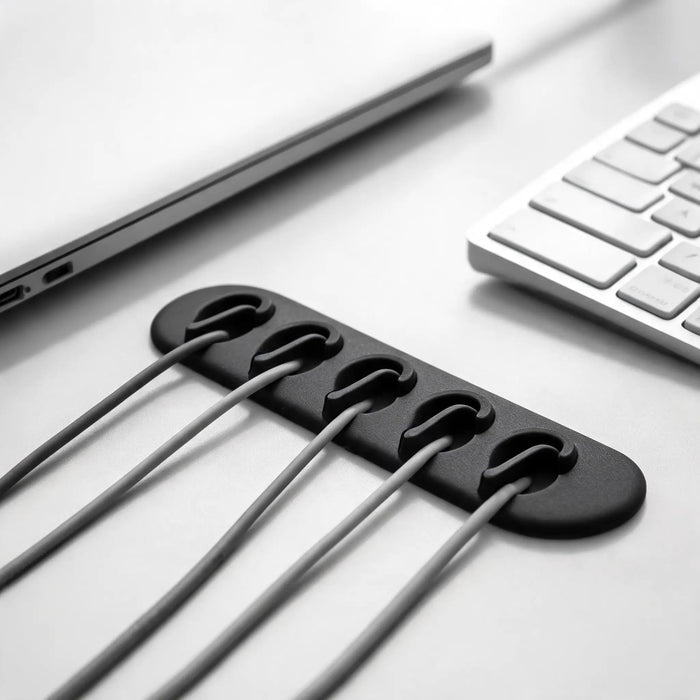
Trust me on this: a tangled mess of cables under your desk isn't just ugly; it's a hazard and a mental drain. I used to let my cables run wild. It made cleaning a nightmare, and finding the right cable felt like an archeological dig. Now, my space is tidy, and my brain thanks me. Effective cable management can reduce desk clutter by 70%, boosting perceived organization and reducing visual distractions.
The principle is simple: get them off the floor and out of sight. Cable sleeves, ties, and clips are your best friends here. A simple ruler can often double as a cable guide for temporary setups. You don't need to be an engineer; just a little planning goes a long way.
Lighting: Beyond glare and into focus
Many people overlook lighting beyond just "can I see my screen?" The wrong lighting can cause eye strain, headaches, and even impact your mood and sleep cycle. I'm not gonna lie, I was skeptical about dedicated desk lighting for years, but now I don't work without it. Proper task lighting can increase reading speed by 10-15% and reduce eye strain by 30%.
- Task Lighting: A good desk lamp provides direct, adjustable light for your workspace without creating glare on your screen. Look for lamps with adjustable color temperature (warm to cool) to match the time of day.
- Ambient Lighting: This is the general lighting in your room. It should be soft and evenly distributed to reduce contrast with your screen. Avoid overhead lights directly above your monitor.
- Natural Light: The best light source, hands down. Position your desk so natural light comes from the side, not directly in front or behind your screen, to avoid glare.
The benefits of a standing desk (and the right way to use it)
Okay, so everyone talks about standing desks. They're not a gimmick, but they're also not a magic bullet. The point isn't to stand all day; it's to break up prolonged sitting. I've heard too many stories of people getting a standing desk and then just standing for 8 hours only to get sore feet. That's not how it works. Research from Cornell University suggests that alternating between sitting and standing every 30-60 minutes significantly reduces back pain and improves focus.
- How to Use It: Start slow. Stand for 15-30 minutes an hour, then sit. Gradually increase standing time. The ideal ratio is 1:1 to 1:3 standing-to-sitting.
- Anti-Fatigue Mat: If you're going to stand, get one of these. They make a huge difference for foot and leg comfort, reducing fatigue by up to 50%.
- Adjustability: Look for electric standing desks that adjust smoothly and quietly. Crank desks are cheaper but less convenient for frequent transitions.
Decluttering and organization: The mental game
A cluttered desk leads to a cluttered mind. I think anyone who's tried to work amidst stacks of papers and forgotten coffee cups knows this. Visual noise is a real productivity killer. This isn't about being a minimalist; it's about being efficient. Clear surfaces allow for clear thought. A Princeton University study found that physical clutter in your workspace can reduce your ability to focus, decreasing productivity by 20%.
- "One-Touch" Rule: Handle mail, documents, or new items once. Process it, file it, or toss it immediately.
- Vertical Storage: Use shelves, drawers, or monitor risers with storage to get items off your desk surface.
- Only Essentials: Keep only what you use daily within arm's reach. Everything else belongs in storage.
- Dedicated Spots: Give everything a home. Your phone, pens, notebook, even your coffee coasters – they all need a specific spot.
Considering a white desk: Pros, cons, and aesthetics
Aesthetics play a role in your overall work experience. A white desk, for example, is a popular choice, and for good reason. It can brighten a room, make a space feel larger, and provide a clean backdrop. I've had both dark and white desks, and the vibe is definitely different. But there are practical considerations too. White desks are often chosen for their ability to reflects light, making spaces feel 15-20% brighter and more open.
- Pros: Reflects light, makes small spaces feel bigger, modern aesthetic, can be a blank canvas for personalization.
- Cons: Shows dirt, dust, and smudges more readily. Requires more frequent cleaning. Can feel clinical without warming elements.
- Maintenance: If you choose a white desk, invest in good desk pads and coasters to keep it looking sharp.
Is a white desk hard to keep clean?
Yes, a white desk tends to show dirt, dust, and smudges more visibly than darker surfaces. While it requires more frequent wiping, using a high-quality desk pad can significantly reduce the need for constant cleaning and protect the surface from marks or spills. Regular cleaning with a microfiber cloth and a mild surface cleaner is usually sufficient to maintain its pristine appearance.
Setting up your computer table for peak performance
Whether you call it a desk, a workstation, or a computer table, the principles of setup remain. It's about creating an environment where your gear works for you, not against you. My goal is always to reduce friction – physical or mental – from the moment I sit down. A well-organized computer table can boost productivity by 10-15% by reducing time spent searching for items and minimizing distractions.
- Zoned Approach: Divide your desk into zones: primary work zone (keyboard, mouse, monitor), secondary zone (notebook, pen, personal items), and storage zone (items used occasionally).
- Power Strip Management: Use a power strip mounted under your desk for easy access and to minimize cable spaghetti. Label your plugs too; you’ll thank me later.
- Personal Touches: Add a plant, a photo, or some aesthetic decor. These elements can boost mood and reduce stress, but don't overdo it to avoid clutter.
The role of small details: Rulers and coasters
Okay, so a ruler and coasters aren’t exactly revolutionary, but they highlight a principle: every item on your desk should have a purpose. A good ruler is a basic utility, vital for quick measurements or aligning documents. And frankly, a coaster saves your desk from those annoying rings that ruin wood and etch into finishes. Using coasters consistently prevents heat and moisture damage, preserving desk surfaces and extending their lifespan by several years.
- Ruler: Keep one easily accessible. I prefer a metal or clear acrylic ruler for precision.
- Coasters: Invest in a set you like. Cork, silicone, or ceramic are all good options. They’re cheap insurance for your desk surface.
Why do i need a desk pad if i have coasters?
You need a desk pad to protect a larger surface area from scratches, general wear, and accidental spills, while coasters specifically guard against moisture rings and heat marks from cups. A desk pad provides a consistent mousing surface and covers a significant portion of your desk. Coasters, conversely, offer targeted protection for drink placement, making them distinct yet complementary accessories for maintaining desk integrity.
Internal links for deeper dives: Building your optimal workspace
This article covers the main points, but each element deserves a closer look. To truly build a workspace that works for you, you'll want to explore the details. My team and I have compiled in-depth guides on specific components to help you make informed decisions.
- Choosing the Right Ergonomic Chair
- Optimizing Monitor Position & Settings
- Best Ergonomic Keyboards and Mice
- Standing Desk: Benefits and Proper Usage
- Essential Desk Organization Tips
- Cable Management Strategies for Clean Setups
- The Impact of Task Lighting on Productivity
- White Desk Care and Maintenance
- Choosing the Perfect Desk Pad
- Coasters: Protection and Aesthetics
What to take away from all this
My point here is simple: don't overcomplicate your desk setup. Focus on the fundamentals first. Get your ergonomic posture dialed in. Protect your eyes. Keep your space tidy. The fancy RGB lighting and custom keycaps can wait until you've got the basics covered. Investing in your workspace is investing in yourself and your output. It’s an ongoing process, not a one-and-done purchase. Start with the core elements, then iterate based on your experience and needs. Your body and your brain will thank you for it.
Get Expert ConsultationUpgrade your desk: browse ArcosGear laptop stands to lift your screen to eye level and work more comfortably.